Patching Windows has become more important in AI era

By Jiong Lu

Disclaimer: This personal blog analyzes public data from vendor and NIST websites to examine the recent rise in Windows 11 CVEs and its implications for patching. It explores several possible AI-related explanations, but these hypotheses are not official vendor statements and are not presented as proven causes. The views are my own and do not represent Microsoft or any other vendor mentioned in the article.

Windows 11 CVEs Surges

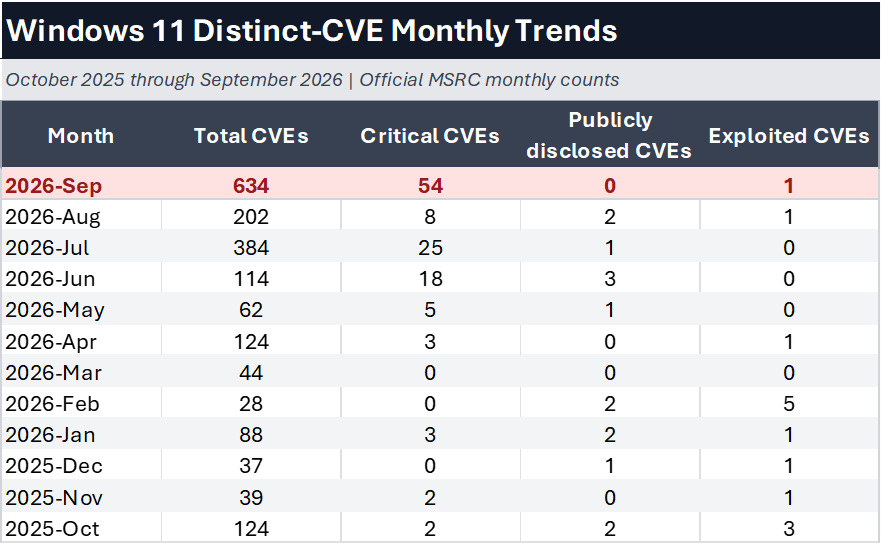
Let us look into the counts of CVEs for Windows 11 Security Updates released in the past 12 months. 
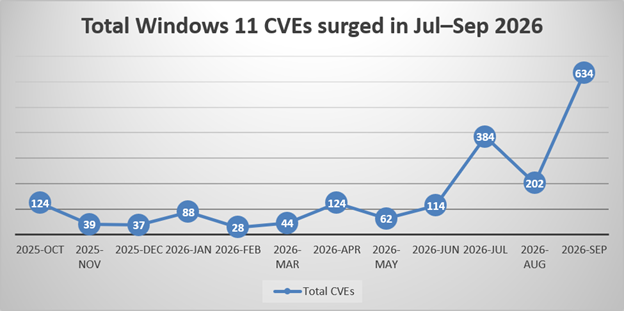
(data source:  https://api.msrc.microsoft.com/sug/v2.0/en-US . with filters applied to include Windows 11 only).

The number of CVEs that recent Windows 11 security updates resolve are surging, from around 100 to now over 600.  And there is no sign that this number will decrease in coming months.  People may ask: Why?

There are 3 possible explanations:

These explanations all relate to AI usages.   

  • More findings are reported to Microsoft by external security experts and enthusiasts
  • More findings come from Microsoft internal code analysis against legacy codes
  • Capability of fixing reported vulnerabilities has increased (and is still increasing)              

More findings are reported to Microsoft by external security experts and enthusiasts

For external security experts and enthusiasts, the tool to detect operating system’s defections are much stronger when AI enhanced.  The AI enhanced fuzzing tools can submit better test inputs, compose better file test contents, generate strange enough test network packets to “crack” Windows than ever before.  AI enhanced tools can also analyze API parameters of dll or exe from their public debug files and create test pattern accordingly.  The same thing could be done by human beings in the past but with AI assist, this becomes faster, more accurate and reusable.   Whitehat security experts will then report findings to software vendors more frequently.   We just do not have an official statistic number from Microsoft (usually MSRC) since it is confidential.

More findings come from Microsoft internal code analysis against legacy codes

At the same time, it is also possible that Microsoft starts to use AI to scan its legacy codes written/tested by human in the past and find more vulnerabilities.   I found that there might be a way to tell if a CVE is Microsoft internally found or externally reported:   by checking the Report Source or the name listed in Acknowledgement.  And after the check here is what I got, among 634 CVEs of September:

  • 29 CVEs have reporters (or among all the reporters, some) coming from Microsoft Internal
  • 34 CVEs didn’t mention reporters, nor in Acknowledgement (blank)
  • 74 CVEs have reporters named as “Anonymous” only
  • Remaining 497 CVEs have reporter names.

With the above analysis, it seems that most patched CVEs come from externally reported source, unless Microsoft also uses strange names in the reporter sources.  Microsoft may start to use AI to analyze legacy codes, but it either gets fixes without any announcements, or the numbers are not increasing to the same level as of external reported issues.

Capability of fixing reported vulnerabilities has increased

I personally believe this is the most relevant explanation among the three.   Like most OS vendors or even open-source communities, when bugs are reported, the capacity of fixing them has a cap which usually leads to a backlog of unfixed bugs in a queue.  When AI assist comes into helping the developers to fix the backlogs, it could speed up not only the defection fix itself but also its testing and its quality assurance.   This may be the primary reason for the latest CVE count surge in the security patches.

This (fixing backlogged bugs) may last for another several months.  We could possibly see the number of fixed CVEs keep at high level for some time longer until most backlogs are cleared and then a new balance of findings vs fixes come into place.  We do not yet know how big (or small) of the total monthly amount will be.  But that number will be higher than the old normal (before June 2026) but lower than the new normal (Sept 2026).

User Impact

What do all these mean towards end users?

Exploits will increase, especially zero-days

As mentioned above, while it is “easier” for Whitehat security experts to detect vulnerabilities, it is also “easier” for bad guys to find them and create exploits.  This does not yet show in the official numbers but yes they will come for sure.  And for the same reason, we will possibly face more zero-days.
Reverse engineering from patches to exploits will increase

Recent trends of exploits are also telling one more story: malicious users (attackers) are now analyzing vendors’ monthly updates and use them to create exploits.  They are able to do so because they can compare the 2 versions of the same file: before and after the patch and then find the difference.   It is also not only the binaries they are comparing, but the official debug files of the correspondent binaries.  In the past, these analyses required in-depth machine code understanding and system level architecture knowledge, so the barrier was high.  But it may no longer be so as AI assist is now in place.

As a result, if you do not patch your system quicker than malicious users create their exploits, you are definitely taking risks.

Patch compatibility tests are taking longer

For a lot of companies, patches cannot be applied directly into productions.  They need to go through a test environment first to confirm their compatibility with existing systems.  Because the total number of CVEs from a monthly update has now increased to a very high amount, it takes longer for this compatibility test to complete.   And because Microsoft no longer releases patches for individual CVEs, the decision has to be made to either patch everything or patch nothing for that month.   It will be a difficult choice unless compatibility tests also speed up.

As users, we need to speed up compatibility tests with AI assist.  Or we will be left in cold in the new era.

Conclusion

Not every reported CVE will be exploited, and not every exploit will lead to a successful attack. Even so, timely patching generally reduces exposure to known vulnerabilities. Individuals and organizations should balance security urgency with compatibility testing, staged deployment, backups, and documented mitigations when immediate installation is not possible.

Patch your systems faster! please!

9/14/2026

Debian 12 (Bookworm) SSTP VPN Issue

Troubleshooting certain websites that fail to load after a successful VPN connection

Summary

After upgrading from Debian 11 (Bullseye) to Debian 12 (Bookworm), SSTP VPN connections may establish successfully, but some HTTPS websites fail to load.  For example: google.com may work but news.yahoo.co.jp does not.

Observed Symptoms

·         SSTP VPN connection establishes successfully.

·         DNS resolution works normally.

·         Some websites work (for example, Google).

·         Some websites fail to load (for example, Yahoo Japan).

·         Firefox and Edge exhibit the same behavior.

·         curl -v stalls after sending the TLS ClientHello.

Example:

$ curl -v https://www.yahoo.co.jp

*   Trying 182.22.23.252:443…

* Connected to www.yahoo.co.jp (182.22.23.252) port 443 (#0)

* ALPN: offers h2,http/1.1

* TLSv1.3 (OUT), TLS handshake, Client hello (1):

No further output is displayed.

Affected Versions

Environment where the issue was reproduced:

PackageVersionArchitectureDescription
libsstp-api-01.0.18-1amd64SSTP client API library
network-manager-sstp1.3.0-2amd64NetworkManager SSTP plugin core
network-manager-sstp-gnome1.3.0-2amd64NetworkManager SSTP GNOME interface
sstp-client1.0.18-1amd64SSTP VPN client

Root Cause

The issue appears to be caused by an MTU / PMTU problem on the PPP interface created by SSTP. Although the VPN tunnel connects successfully, larger TLS packets are dropped somewhere along the tunnel path.

Reducing the MTU on the PPP interface immediately resolves the problem.

Troubleshooting

1. Show Current MTU

ip link show ppp0

Adjust the interface name if your system uses ppp1, ppp2, etc.

Example:

ppp0: <POINTOPOINT,MULTICAST,NOARP,UP,LOWER_UP> mtu 1500

2. Test Lower MTU

Temporarily lower the MTU:

sudo ip link set dev ppp0 mtu 1420

You may wish to test multiple values:

MTU values to test
1450, 1440, 1430, 1420, 1400, 1350, 1300

Use the highest value that remains stable.

3. Verify Fix

Test previously failing sites:

curl -v https://www.yahoo.co.jp

or

curl -4 -I https://www.yahoo.co.jp

If the website now loads correctly, the MTU issue has been confirmed.

Permanent Fix

Create a PPP ip-up Hook

Create the following file:

sudo nano /etc/ppp/ip-up.d/99-sstp-mtu

Contents:

#!/bin/sh

/usr/sbin/ip link set dev “$1” mtu 1420

logger “PPP ip-up: set MTU 1420 on $1”

Make it executable:

sudo chmod 755 /etc/ppp/ip-up.d/99-sstp-mtu

Reconnect the VPN

Disconnect and reconnect the SSTP VPN connection.

Confirm the Fix

Verify MTU

ip link show ppp0

Expected output:

mtu 1420

Verify the Hook Executed

journalctl -b | grep “PPP ip-up”

Expected output:

PPP ip-up: set MTU 1420 on ppp0

Final Notes

·         The working MTU discovered in this environment was 1420.

·         If desired, test larger values and keep the highest value that works reliably.

·         The symptoms only became apparent after upgrading from Debian 11 (Bullseye) to Debian 12 (Bookworm).

·         Lowering the PPP MTU resolves TLS handshake failures for affected websites.

Quick Reference

Show MTU

ip link show ppp0

Temporarily Change MTU

sudo ip link set dev ppp0 mtu 1420

Verify Fix

curl -v https://www.yahoo.co.jp

Permanent Fix Script

sudo nano /etc/ppp/ip-up.d/99-sstp-mtu

sudo chmod 755 /etc/ppp/ip-up.d/99-sstp-mtu

Confirm Hook Execution

journalctl -b | grep “PPP ip-up”

Keywords: Debian 12, Bookworm, SSTP, SSTP VPN, network-manager-sstp, TLS handshake, MTU, PMTU, PPP, pppd, Yahoo Japan, curl, VPN troubleshooting.

Intel新出使用18A技术的笔记本处理器到底达至何种水准

Jiong Lu

英特尔新出的Panther Lake处理器,是他第一次使用Intel 18A制程生产的X86指令集的主流处理器。我们一定都很好奇这个处理器到达了什么水平,他解决了Intel近年被制程困扰的问题么?他让英特尔回到了舞台中央了吗?他让英特尔赶超同行了吗?

让我们不用网络传言乃至分析师的小道消息,而是用实际的数据和测试来说话,来仔细轮流分析这些问题。 今天我们主要使用极客湾的公开测试数据来进行分析。纵观全世界范围互联网公开发表的测试结果,能够做到测试深度广度和技术严谨性全部到位的,真的还就当属极客湾这个博主了,这里还是一如既往地给他们一个大赞。

极客湾的测试数据很多很复杂,要回答我们最初提的那几个问题,可以主要看Benchmark的结果: (视频9:00-11:20)

但是CPU的Benchmark数据上的提升有可能是由两个变量带来的,第一个是制程的变化(从台积电N3B制程变为Intel 18A),第二个则是设计上的变化。  这两个变量的同时作用,让(各类)Benchmark获得了大约5%-20%的进步。 需要指出的是,这两个变量不一定同时起到正面作用,其中有可能设计上带来了更多的正面进步,而制程有可能是拖后腿的那个。反之亦然。

那就首先看设计上的改造和升级带来的进步,极客湾特别提到以下三点:

  • P核的设计优化 (视频3:30-4:02)
  • 激活LPE小核,允许共享内部缓存并公开调用方法(视频1:30-3:00)。同时降低各核之间的沟通延迟。
  • 把内存控制器从核外搬回到了核内,特别明显地降低了内存(包括缓存)操作的延迟。(视频4:50-5:30)

以上三点改进单独从测试数据即可看到明显的差别。虽然无法将这三个变量单独提出来获得它们对性能提升的权重比,但根据过去同类产品测试的经验,这几项测试数据对CPU的得分影响是很大的。所以可以有相当程度的信心预计:“设计这个变量带来的性能提升,是这次迭代的主要变量因素。”

接下来尝试分析制程这个变量。很可惜,我们无法让Intel把同样的CPU设计送去台积电来制作另一个版本的Panther Lake,否则的话就可以严格单独测试制程上的进步(或者差距)了。而且估计Intel也会特别忌讳如此操作,以免Intel 18A制程在刚刚起步的阶段受到不必要的负面批评。

从以往Intel不更改制程而仅靠迭代设计来发布新一代产品的历史记录来看,迭代升级时带来的性能升级也就是5%-40%左右。所以无论如何设计带来的进步是在有限范围之内的,那Intel 18A制程和上一代Arrow Lake使用的台积电N3B之间的差距将会非常之小。这个猜测出来的结论到底对Intel 18A制程是正面还是负面的评价,这个就让分析师们去发挥了吧。 更何况台积电的N2已经成熟,A14也在路上。

但依我来看,起码可以说以下几点:

  • Intel 18A制程不会一夜之间赶上台积电的最新技术,但是它是美国Made in USA的最新努力。也是Intel改革后的第一次尝试。结果来看不算靓丽,可算及格。但起码他有一个起跑了。他没有彻底解决Intel的困扰,却是开始有了希望。
  • 对于Windows用户而言,特别是能耗和续航带来的焦虑,曾经有段时间都说因为Intel x86处理器的各种拉垮,是不是都要走去ARM了。今天的Panther Lake让用户可以选择回头使用x86处理器了。 这点对于Intel来说,那曾经是战火都烧到自己屋子里面的情况算是有所缓和。他没有立刻让英特尔回到舞台中央,但在桌面领域已恢复至三号乃至二号的地位了吧。
  • Intel和AMD的比赛是接下来的重头戏。Intel能不能在制程和设计上双发力,赶上乃至抛离AMD,拭目以待。

老船要调头并不容易,一般要靠新的赛道才能回到领头的位置,仅靠追赶现有技术是没有希望的。所以若要赌Intel大放异彩,那还真是件大胆的尝试。

手机的一加选择

OnePLUS ACE 5

在口味选择方面,我自己都承认是小众里的小众。 当年生活在东京的时候,但凡我喜欢的餐饮店,后来证明都是撑不过很长日子的。比如有一家开在大Mall里的小店,餐牌很短,主打的夏威夷菜。我最喜欢一道是他们家的牛尾汤,用料讲究味道鲜美。每次我点的时候还特地跟店员要求“少放花生,多放香菜”。去得多了以后,这些便都不用提,店员们也都认识我,所以直接端上来就是了。怎么说呢,他们家也就开了不到两年,之后的某一天我突然发现他们家的门面换成了冰淇淋铺子。要知道日本店家开两年就关门的,在2015年以前是很少见的。不过这样的事情对我来说也不是头遭,这里的心情用六个点的省略号表达最为贴切,如果脸上再划三条渐长的竖线那也不是不可以。

好了,回归正题,我讲这个也就是啰嗦了一下口味的特殊性,今天讲的手机使用体验也同样如此。他既不含有任何实际测评意义,连推荐的成分或许都没有。随笔几句记录下来,方便以后有空时自己回头嘲笑一下当初的自己。

我的主手机是苹果13Mini,一方面是工作需要,另一方面是极佳的小屏体验。不过正如上面讲的,但凡我喜欢的,苹果就做了没能超过两年。好在今天也不是讲13Mini,今天讲一加手机。 对的,我同时持有iOS手机和安卓手机,而关于安卓那一部分,上个月我的习惯跳槽去了一加品牌那里,入手了一加的Ace 5

说说我喜欢Ace 5的主要几点:

第一个是Ace 5的外在用料和设计。用料上,她采用金属边框和玻璃背板,加上一流的京东方屏幕质素。这些都不输给顶级价位的手机。她的外观设计也是循规蹈矩,深得我心。使用短焦指纹认证虽然在网上被说成是致命一击,但作为消费者要知道,所谓更高级的超声波指纹的使用感觉并不极致飞跃,而成本则为短焦的七八倍达到了200元人民币左右,所以起码在目前这个阶段,使用超声波指纹的手机厂商在次旗舰方案设计上的成本配重方面反而是值得怀疑的。

第二个是内在,除了骁龙8Gen3的采用,更有包括DDR5规格的RAM, Wifi-7规格的无线,UFS4.0规格的Storage的使用等等。 对我们技术人员来说,所有不列在参数表里参数,才是真正体现产品质素的地方。 这方面最有名的例子就数Thinkpad笔记本了,我想即便是今天也有很多人不理解“配置”如此普通的Thinkpad到底特殊在哪里。

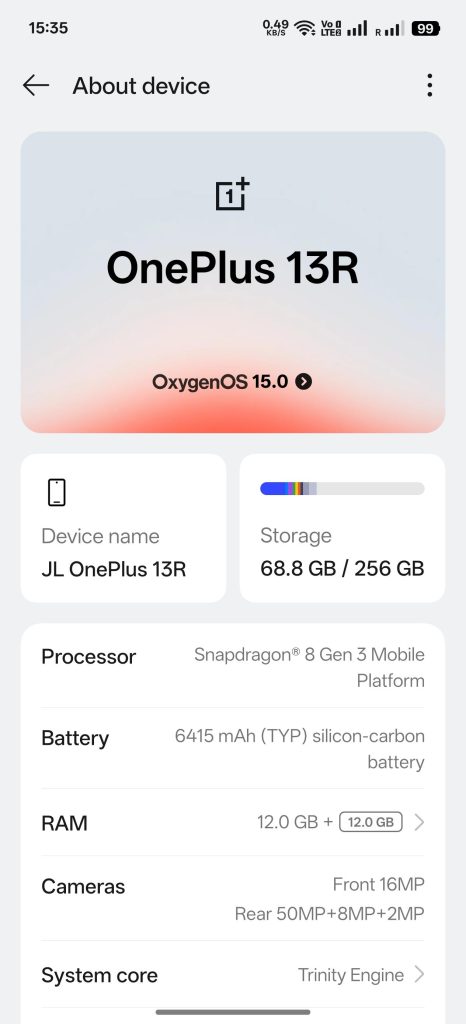
好了,接下来来了。上面这些还达不到一加之所以Outstanding的缘由。一加的最大独特之处就是她支持解锁,拥有此特性的Ace 5可以进一步摇身一变变成一加13R。这个就非常可以了。Ace 5是一台售价250美元的手机,而13R在全球售价就起码450美元(印度版,配置更低)了,放在北美市场的话那就是600美元出头的价格了。

最后一个则是导入氧OS带来的特点。氧OS接近原生态安卓,体量小,反应快,使用流畅,因此深受很多口味独特发烧友的喜爱。另外的特点包括可以帮助跳过原厂系统对应用安装的限制。不过需要指出的是,原厂系统上这些正规的“未通过审核” 的绿坝式限制警告是有用的,她们可以制止特定安装,比如所有想用App看FBI警告的人,也会把浏览记录向上汇报以达至监督的效果。所以跳过限制的这个特性仅限于发烧友测试使用,或者在境外有使用当地应用的需求。 同时使用氧OS也可能会因此失去反诈骗机能。反诈骗功能相当于一双敏锐的眼睛时刻注视着系统的里里外外每个角落,一双耳朵辨析周遭的是是非非,及时发现风险并作出拦截。失去这样的帮助会加大风险,且后果需要自己个人来承担。

一加手机的极致性价比,和解锁的能力,早在发烧友群体当中就已经拥有一定的地位。但是发烧友毕竟是少数,对于手机厂商来说,面向小众的方案往往是悲哀而不能持久的,正如我喜欢的餐饮店们那样。

因此我今天写这个文章还是有一点私心的:小众们多多支持自己喜欢的产品或服务的同时,如果稍稍愿意多和大众们分享会如何呢?    思绪飞扬,多吃几碗牛尾汤许是带不回来那家小店,多写几篇LOG也应该带不回。但是做与不做就是我自己的分界线了。

2025/4/9

“Is Linux a better choice for old devices?”

Jiong Lu

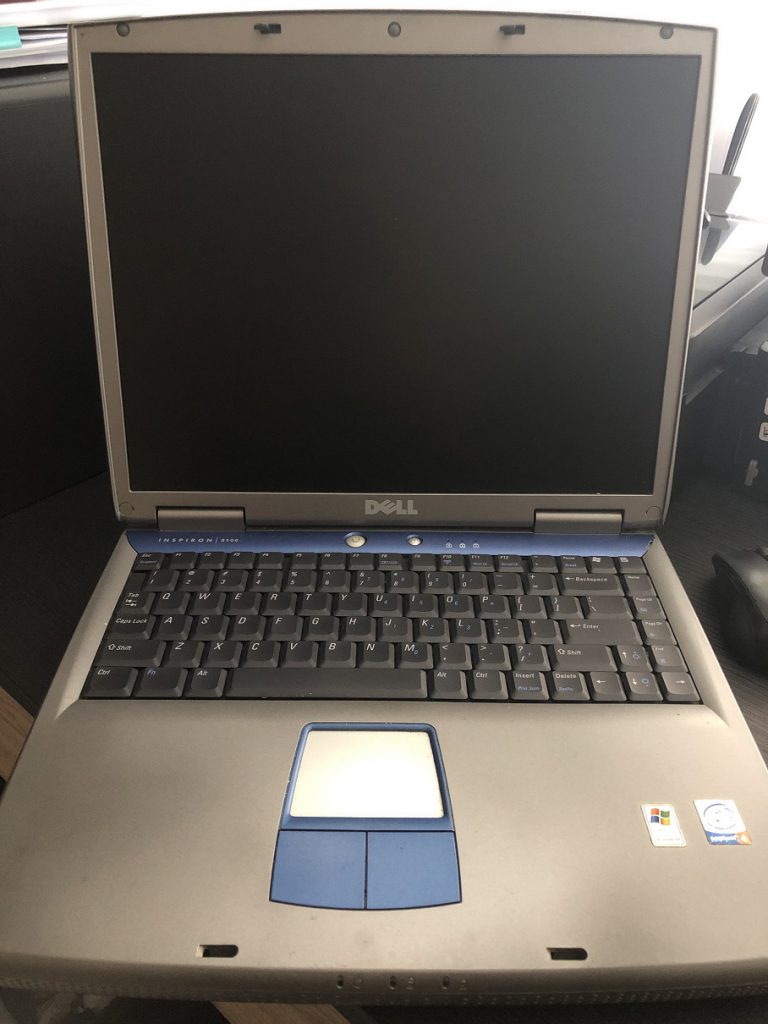
I have a year 2003 Dell Inspiron 5100 notebook sleeping in the closet for almost 15 years and she is going to turn 19 this year. Recently I took it out and was wondering what I can do with it.  And finally, I decided to do a small project: Find out “Is Linux a better choice for old devices?”.  While following modern path like creating a YouTube video might be quite sounding, I am indeed not confident in shooting or editing so I prefer to stick with the old school style by just writing this article. At least I can learn a lot from the whole experience.

And never forget to Disclaim: this is a very biased article written by a MS engineer, and the research covered just one PC that obviously does not have its statistical significance.   The proper title might be: Is Linux a better choice for an old device owned by a MS engineer?     If that makes us all feel better. LOL

CPU

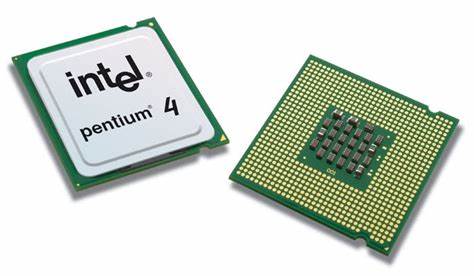
My Inspiron 5100 comes with a Pentium 4 2.4G (Northwood) CPU.   It is a 32-bit desktop CPU installed on a notebook, hot, slow, and always hungry for power with average DLP of 59.8w.  Starting from 2020, a lot of Linux distros stopped releasing new 32bit versions.   I decided to pick Linux Mint 19.3 as it is Ubuntu 18.04 based and it is yet widely used 32-bit supported OS.

For Windows, since Pentium 4 has SSE2 instruction set (and Pentium III does not), Windows 7 can yet run on it.  And Windows 7 is arguably still supported by Microsoft with ESU licenses (which is a paid service though), as of today, January of 2022.  I have thought of running Windows 8.x or Windows 10/11.   But the video card limitation and the NX bit security requirement shut this option down.

Pentium 4

Technically you can install any kind of end-of-life obsoleted OS onto an old device.  But this is not the point of my test.  My point is to test use the old device in modern days, which requires the OS to at least be still supported, can be security patched.

Conclusion: When comes to Operating Systems choices for CPUs, Linux is not that picky.  For recent new CPUs, kernels can be compiled and optimized to utilize the new features provided by them. But at the same time Linux does not say no to old CPUs.  It just won’t perform as good.  On the other side, Windows does have requirements for CPUs especially NX Bit, SSE2 and SSE3 etc.  And this 19-year-old Dell PC can run Windows 7 at its best.  

Meltdown and Spectre

One interesting thing needs to be pointed out (not relevant to the topic of this article) is that, like most Intel CPUs developed before 2018, this Pentium 4 is vulnerable to Meldown or Spectre (v1, v2) attacks.   And what’s make it worse, is that Pentium 4 (Northwood) uses a 20-stage (for Pentium 4 Prescott model, it will be 31-stage) long pipeline, compared with modern CPUs that only have 14 stages or less.  The 20-stage speculative technology used was specially designed for Pentium 4’s high CPU frequency, so that it can run more instructions per second by putting more in its cache and predicting more to run them simultaneously.  Which made it even more vulnerable to Meldown or Spectre (v1, v2 etc.) attacks.  There are OS patches to mitigate these types of threats, but they have quite a performance hit for speculative technology, especially with those having long pipelines like Pentium 4.     I choose to turn this mitigation off (on both Linux and Windows) and keep telling myself not to store anything important/sensitive on this little old device.  And… it turns out that the performance difference can be felt by human beings.

Video Card

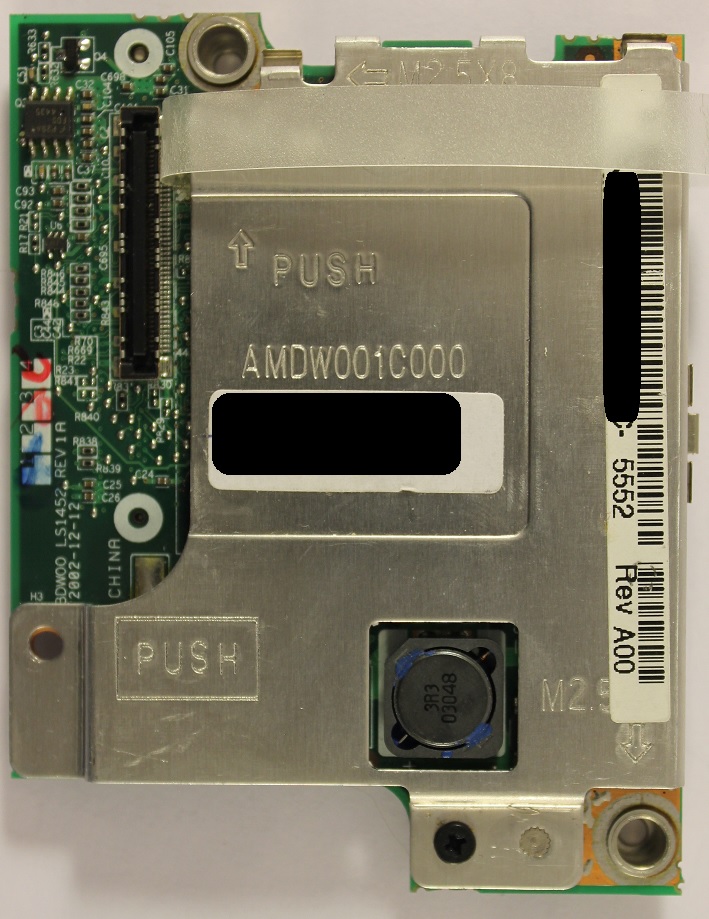
This Dell Inspiron 5100 has a very weak AGP type video card: ATI Mobility Radeon 7500c (RV200 on Linux).    After install Linux, video card hardware acceleration works on Linux Mint when the kernel version is at 5.0.x (or below), but when kernel gets upgraded to 5.4.y (or versions above), only software rendering (by CPU) is used by the display manager, which made the system not usable.  It does not matter what display manager I choose (Mate, Cinnamon, XFCE etc.), it is 100% the kernel that made such difference (well, that is what a kernel should be.  But worth confirming, isn’t it? :))

Mobility Radeon 7500

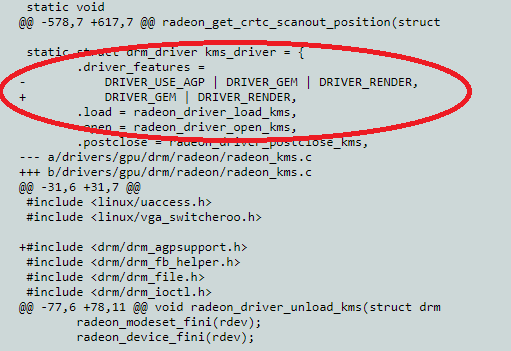
As a long-time Windows user, I am not familiar with how Linux kernel handles hardware support. But I decided to do further research because Linux is open source. Yeah, why not!   And after some Bing search and code reading, I found it.  Yes, there it is!  I at least found where the driver support difference occurs:  The AGP card support for ATI Mobility Radeon 7500c was dropped by Linux Kernel starting from version 5.4.24.   You may find the details from these 2 patches: [PATCH 5.4 079/152] and [PATCH 5.4 080/152].   The 079 patch removes the AGP card support for amdgpu driver and the 080 patch removes the same for radeon driver.  The approval date of these 2 patches was Mar 03, 2020.  If you also have an AGP type of AMD video card and want to use it on Linux, you will very likely face the same issue.  I didn’t test the same for any AGP type of NVIDIA card though (edited 1/20: there are articles saying AGP support for both AMD and NVIDIA is dropped, around early 2020).  From all the work done above, I really learned a lot on how Linux community manages source codes, their modification histories, and the review / approval procedures.  Very impressive.   And this might also lead to another future project: what if I recompile the kernel to bring the AGP card support back? Edited 1/20: don’t get me wrong, I am not saying reverting these 2 patches will be all needed to do to bring AGP back. There are codes relating to it which do the real work and I am sure there will be quit a lot of them and almost everywhere. The Linux community said that it is difficult to keep maintaining AGP so that’s why it is dropped. Bringing it back will be easy to say, very difficult to do. But it is still on my list for exploring.

Code Change in Linux Kernel 5.4.24

Now, how about Windows then?   Mobility Radeon 7500c on my Inspiron 5100 has only 32M dedicated ram and it only supports DirectX up to version 7.  The most important thing is that the official vendor support just provides the driver for Windows XP.  There is no official driver for Vista or Windows 7.   But it does not prevent you from installing the XP driver onto Windows 7, you get all basic functions but not those Windows 7 dedicated visual effects like aero.   This is called a XDDM driver.   And those official Windows 7 video cards should be using WDDM drivers (supporting DirectX 9 or above, and at least 128m ram).   Starting from Windows 8 and all versions after it, XDDM drivers are no longer supported.  Hence Windows 7 is the highest version this Inspiron 5100 can run (sort of).

Conclusion: This weak AGP card seems not working well on either Windows or Linux, and for Linux it is already not supported.   In terms of performance, it worked better on Windows 7, compared with cinnamon (on Linux Mint).  On cinnamon, a process called “cinnamon –replace” keeps popping up even at idle which shows that CPU assistance is always required for the DM to render the desktop.  Browsing (with hardware acceleration) is already too much work for this video card on both OS, not to mention opening heavy sites like YouTube.  I did try XFCE or BionicPup32 (Ubuntu based 32-bit Puppy Linux), which runs smoother, but yeah, you can argue the same for using Windows XP to show performance as well. I have also thought of replacing the card with something else, but, nope, that’s just it is (a Radeon 9000 card won’t make much difference either and you cannot go any further).

Wi-Fi Card

The Inspiron 5100 is equipped with an 802.11b/g Dell Truemobile 1150 card (Broadcom chip BCM4306/v2) that requires drivers on both Windows and Linux.   On Windows, the official driver had several version updates, and the latest version enables 802.11b/g/n (for 11n, it is with standard level compatibility but not its speed) so I can turn on 11n mode (for 2.4G) on my Access Point and the card still can communicate with it properly.

On the other hand, Linux driver support was a total headache. The BCM4306/v2 is only supported by b43legacy driver but it is so basic that if I turn on 11n mode (for 2.4G) on the AP, the card just refuses to connect, no matter what channel I assign to it.  Even after I change the AP to 11b mode, the card is so reluctant to work well, keeps dropping packet or returns a ping at level of hundred milli-seconds (it could be because 2.4G channels are so full at my apartment).  And “NO, a NDISWrapper won’t work either” before some of readers may point out.

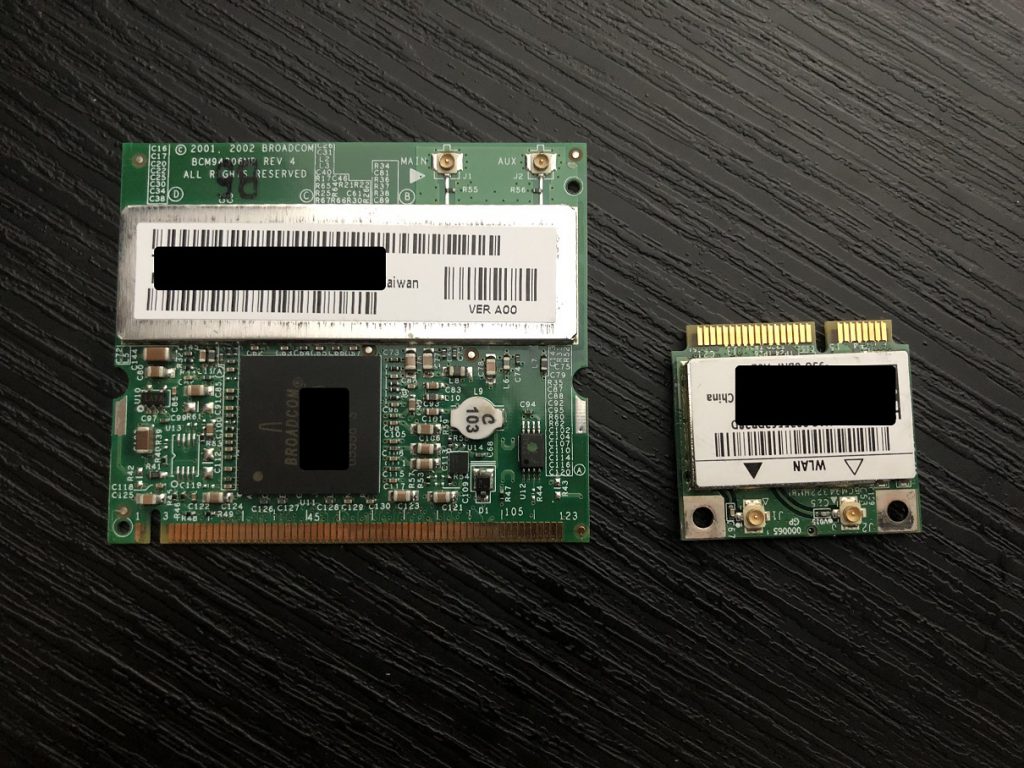
MiniPCI Wi-Fi Card and MiniPCIe Wi-Fi Card

But the good news is, after I spent less than 5 USD bought a Qualcomm AR9220 Wi-Fi card and plug it in, both Windows and Linux are very happy with it.  No drivers needed and it is 802.11a/b/g/n.  It is just great. Problem solved.  For those who may think these Wi-Fi cards look the same as of today, it is not.  They are all MiniPCI type, which is nearly 4x the size of a modern Mini-PCIe Wi-Fi card.  That is history, in 20 years.  (But wait! If you have an IBM, Toshiba, or some other notebooks, don’t assume a new Wi-Fi card will always work because these makers have locked the Mini-PCI cards using whitelist in their BIOS).

Conclusion: For Wi-Fi devices, Windows and Linux are happy with a lot of old Qualcomm chip equipped cards. When comes to the old legacy Broadcom chip, Windows needed a 3rd party driver, Linux just said no.

RAM

Inspiron 5100 can take up to 2G of RAM if its BIOS gets upgraded to version A32 (latest).   They are the first generation of DDR ram, running at 266Mhz and can work under dual channel (1G each).  They cost me about USD 9 in total. Both Linux Mint and Windows 7 are fine with that 2G of RAM.  At least, they were not the bottleneck. 

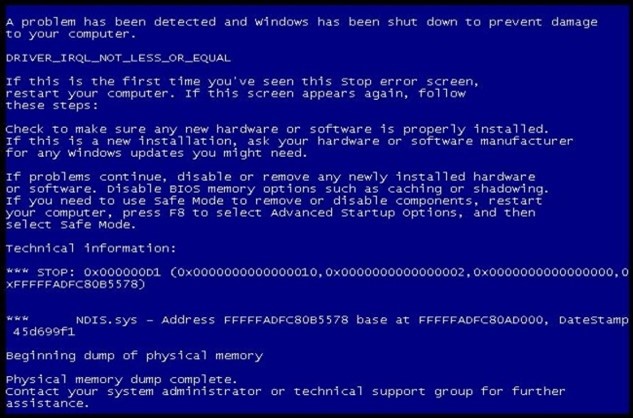
It worth mention that the only broken part of this PC after I took her out from the closet, was one of the old RAM sticks (512M).   It caused a BSoD on Windows 7.   I personally have never met with a broken RAM so that was a nice cool experience, which also cost me several further tests to troubleshoot, isolate (make sure it’s not motherboard) and identify which one was bad. And I am not complaining.   One more interesting thing is that the Dell Inspiron 5100 tested the RAM after that crash and decided to lower the capacity of that RAM to just 192M.   I never know that BIOS will do this type of thing, it was funny but yeah, makes sense.

Broken RAM caused a BSoD

HDD or SSD?

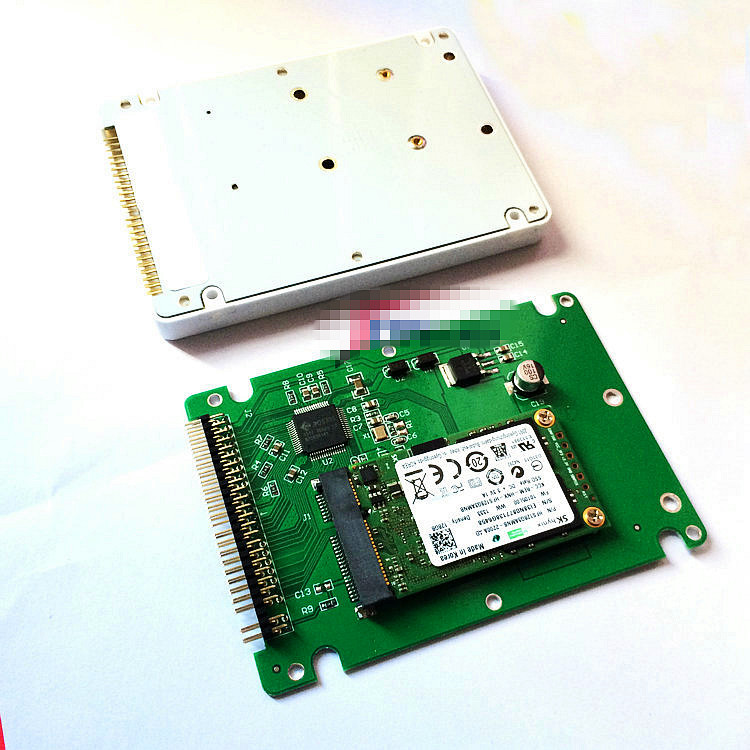
The original storage on this device was a 4800rpm 40G Hitachi hard disk.  It is of IDE type (or PATA).  And it is extremely slow. I spent about USD 19 in total bought a 120G mSATA SSD and an adapter to make it work with PATA interface.

mSATA SSD with IDE adapter

This combination works quite well on both Windows 7 and Linux Mint 19.3.  I had to do similar configuration changes on both sides like enabling TRIM, enabling cache, stop disk defragmentation job etc.   But they are fine with all these changes.   The only complain, which was already expected, is that the SSD does not perform because of the IDE interface and/or the bus.  Read/Write peaks at around 20MB/s-ish, and there is not much we can do with it.   Old hardware is just old hardware and changing the motherboard will be considered going too far for these types of projects.

Both Windows 7 and Linux Mint are installed (dual boot) on the SSD.   They became friends.

Conclusion

OK, time to wrap the test up.   If you ask me “Is Linux a better choice for old devices?”, the answer is complicated (yeah, I hate myself saying that):

At least, Linux is not always the last to drop support for old hardware.  In a lot of cases, they drop earlier than Windows do. We cannot just assume Linux or Windows will work on certain old hardware, because very often they don’t.   If you have a Pentium III PC, the experience would be very very different.

There is never anything other than hardware failure that will prevent you install an outdated obsoleted OS to an old device.   You just don’t get security updates and they may lack ability to work with modern standards like Wi-Fi 4+, TLS 1.2, DirectX etc.  

The performance for an old PC to run “Supported” operating system is, honestly, not good.  I can’t think of many use scenarios for them, other than: Run old single-person games / Keep the PC working until they become antiquities.

While these might be considered as total waste of time, for me, it was still a GREAT experience.  Because it gives me opportunity to learn things from the timeline table: where they come from, how do they work, and what they will change into.   Because of it, I started to learn Linux kernel and who are developing and maintaining them. 

This was a FUN project to start 2022.  And all best wishes to you too!